News
application scenarios of customer display and how to deploy
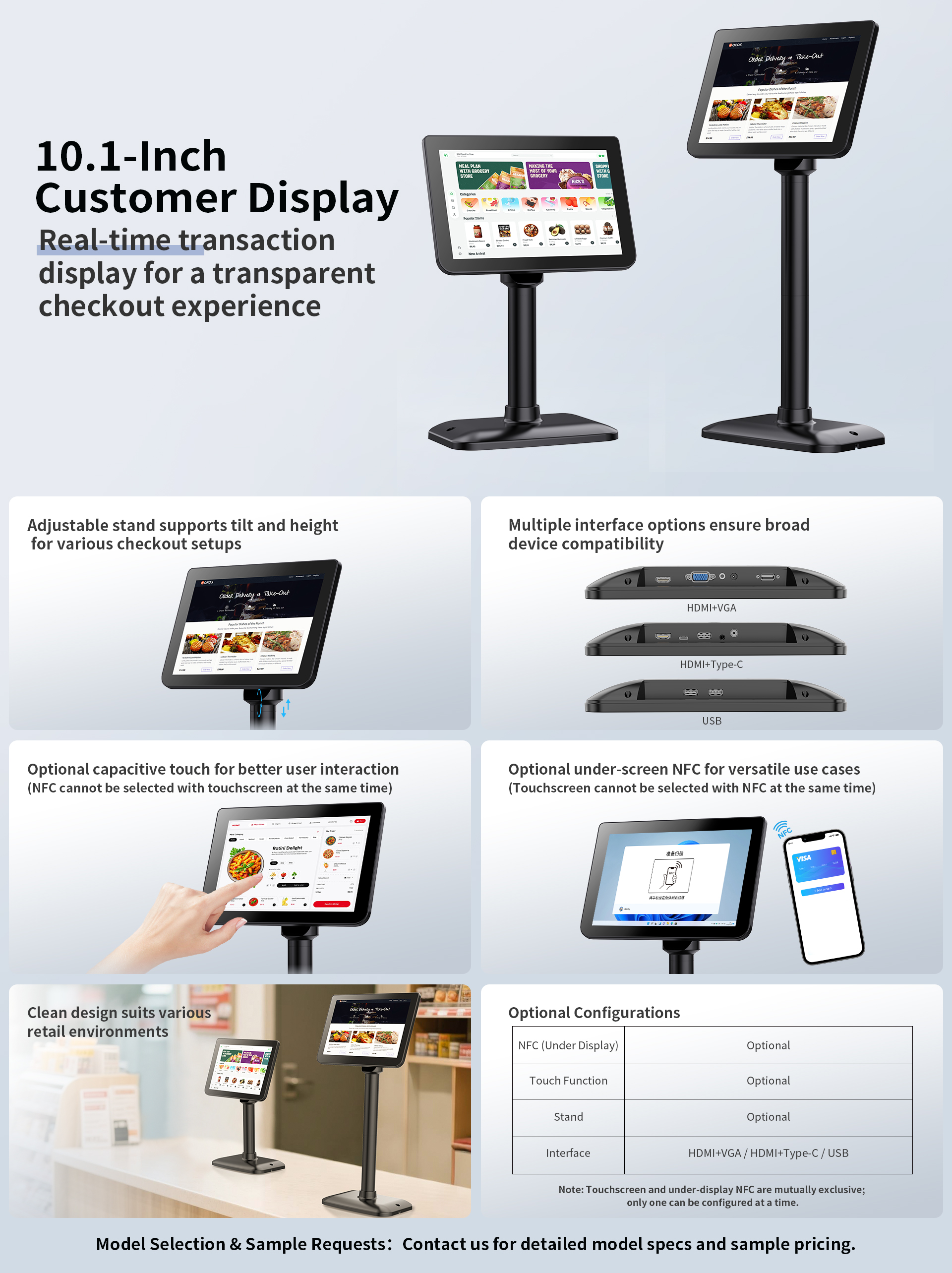
The fundamental value of a customer display (also known as a customer-facing screen or dual-sided display) lies in its ability to synchronize and
transparently present information—originallyintended solely for staff—to the customer, thereby reducing communication friction and enhancing
both trust and efficiency.
What are its application scenarios?
1,Retail/Supermarkets: Customers can clearly view unit prices, quantities, total amounts, and discount details, thereby avoiding disputes regarding calculation errors or unapplied discounts.
2,Restaurants/Bubble Tea Shops: Customers verify order details, add-on options, and pickup numbers, thereby reducing order fulfillment errors and minimizing the time spent on repetitive explanations.
3,Queue Management / Government Service Hall: Real-time display of current service counters, queue numbers, and service status, thereby reducing the burden of manual guidance.
4,Gas Stations / Charging Stations: Clearly display fuel dispenser numbers, transaction amounts, and balance changes, thereby enhancing the sense of security during settlement.
5,Member Points / Redemption: Display successful point deductions, remaining points, and electronic voucher redemption results in real-time—right before the customer—to enhance
the transparency of the experience.
What are Mainstream Specifications and Interfaces (Primarily Based on Commercially Mature Models)
1,Common Sizes: 7" to 15.6", with high-frequency concentrations at 7“,8", 10.1", 12.1", 13.3", and 15.6".
2,Common Interface:
* Communication: RS232 Serial Port (traditional and stable), USB (Plug-and-Play), RJ45 Ethernet Port (Network Version), WiFi/Bluetooth (less common).
* Video Input: HDMI, VGA (supported on select models), Type-C DP Alt Mode (newer models).
* Power Supply: DC 12V/5V Adapter, or USB/Serial Port Power (for small-sized screens).
Based on the three scenarios mentioned Above—convenience stores/supermarkets, dining/bubble tea shops, and government/queue management services—
here is a practical configuration framework ready forimmediate implementation,covering key selection criteria, interface methods, and placement recommendations.
1️⃣Convenience Stores / Supermarkets (High-Frequency Transactions: Emphasis on Error Prevention and Speed
Typical Configuration:
10.1" or 11.6" vertical-screen customer display with a resolution of ≥1280×800 (ensuring text is sufficiently clear).
Interfaces and Connectivity:
POS Side: Prioritize a dual-mode configuration featuring an RS232 serial port (for compatibility with older POS systems) and a driver-free USB connection (for newer all-in-one POS units).
Power Supply: Either a 12V DC adapter or USB bus power is acceptable; the power source should be positioned on the inner side of the counter or mounted on the display stand.
Placement:
Position the display on a vertical stand next to the barcode scanner, facing the customer; alternatively, use a desktop base with the screen tilted slightly upward.
Key Value Proposition: Customers can immediately view the transaction total the moment their items are scanned, eliminating the need for the cashier to verbally announce the amount.
This accelerates the checkout process during peak hours and reduces transaction-related disputes to virtually zero.
2️⃣ Food Service / Milk Tea Shops (Emphasis on Order Verification, Add-ons, and Pickup)
Typical Configuration: 8" or 10.1" horizontal or square screen; requires high brightness (ensuring readability even under strong indoor lighting).
Interfaces & Connectivity:
System Integration: USB-HID (driver-free) interface, compatible with POS host systems or Android All-in-One terminals.
Optional: Models featuring HDMI input can serve as a secondary display for showing queue animations or advertisements (requires software support).
Placement:
Positioned on the customer-facing side of the ordering counter, at eye level with the customer; an additional unit may be mounted at the kitchen pickup window to simultaneously display order numbers.
Key Benefits: Enables customers to verify ice levels, sugar levels, and add-ons on the spot, allowing for immediate corrections if discrepancies are found; the display at the pickup window reduces inquiries
regarding "whose order is still pending."
3️⃣Government Services / Banking / Hospitals: Queue Management Displays (Emphasis on Status Transparency)
Typical Configuration: 15.6" screen (portrait or landscape orientation), IPS wide-angle panel with a broad viewing angle.
Interfaces and Connectivity:
Video Input: HDMI (with VGA as a backup), connected to the graphics card output of the queue management host PC.
Network Capability: Select models support RJ45 connectivity for remote content distribution (e.g., broadcasting rotating service guidelines or announcements).
Placement:
Mounted above the interior side of the service window glass, or positioned on a floor stand within the first row of the waiting area.
Key Value Proposition: Synchronously displays real-time status updates—such as "Currently Being Processed," "Please Wait," or "Documents Incomplete"—thereby
alleviating waiting-related anxiety among patrons and minimizing interruptions for staff members.
--------------------------------------------------------------------------------------------------------------------------------------------------------------------------------------------------------------------------------------------------------
Vast Vision Industry Co,.Ltd is a Chinese manufacture of computer hardware , mini pc , industrial grade embedded touch screen display
,touch screen pos system ,touch screen monitor,Android all in one pc ,digital signage, kiosk .
more details, contact us via info@vastvision.com.cn
RELATED NEWS
- Why Are Most Touchscreen POS Terminals 15 or 15.6 Inches? POS Hardware Guide 2025-01-18
- self ordering kiosk scenary & advantage & disadvantage 2026-03-13
- How to choose capacitive touch or resistive touch monitor 2019-02-16
- the importance of embedded displays and Mini-PCs for self-service terminals (k 2025-02-06
- Why choose fanless pos system 2025-06-15
CATEGORIES
LATEST NEWS
CONTACT US
Contact: Cherry Jiang
Tel: 0755-89329286
E-mail: info@vastvision.com.cn
Whatsapp:0086-13530966019
Add: Bldg. 4, Lane A, Shangxue City,Science and Technology, Longgang District,ShenZhen,GuangDong Province
